 Developer Tools
Templ
Type-safe HTML templating language for Go with compile-time safety
Contents
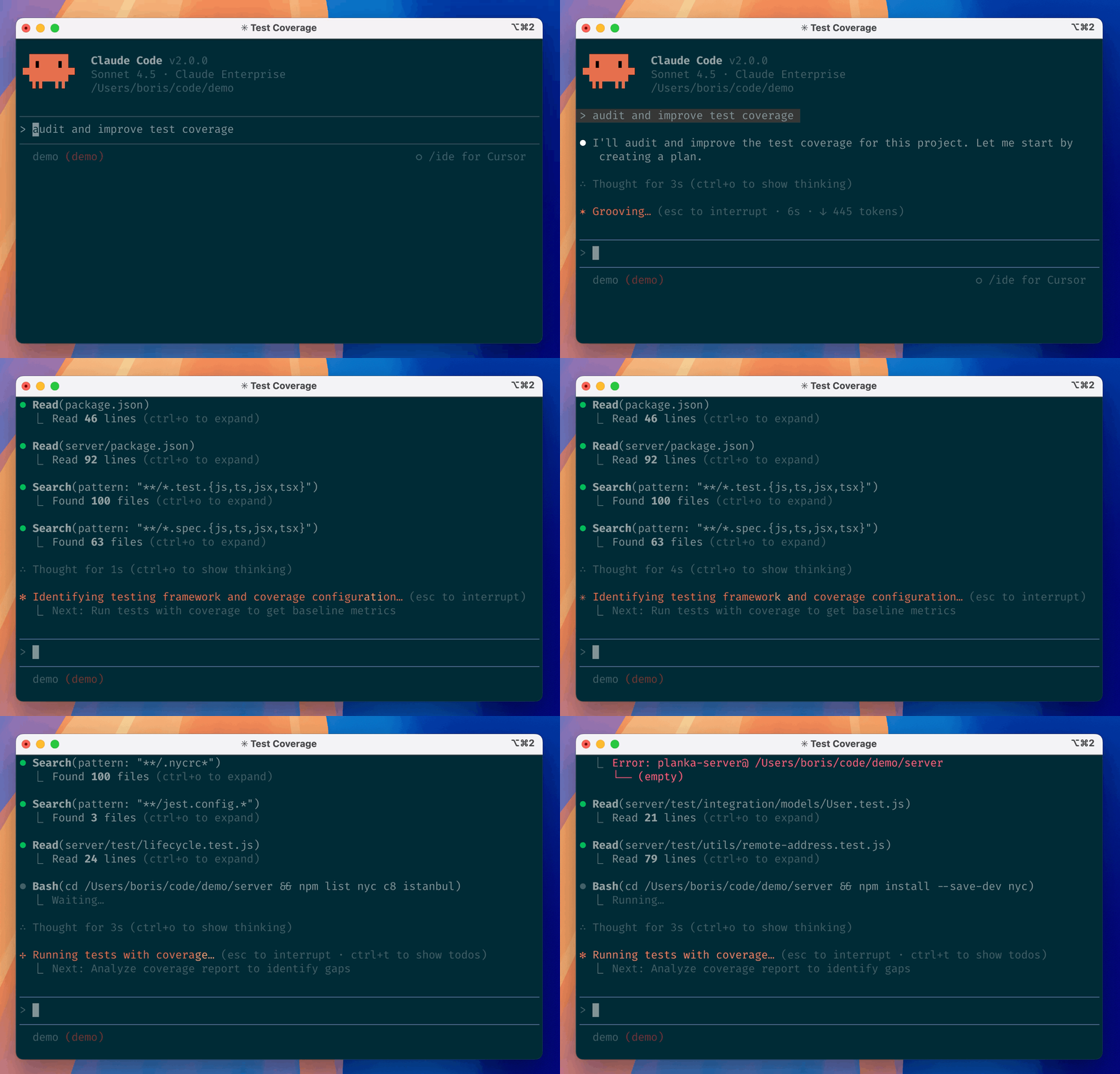
Claude Code is an agentic IDE extension and terminal tool built by Anthropic that understands your entire codebase, executes code changes autonomously, and helps developers ship faster. Available as a Desktop app, VS Code extension, JetBrains plugin, web interface at claude.ai/code, and even Slack integration, Claude Code represents a significant step forward in AI-assisted development—moving beyond simple suggestions to autonomous implementation of multi-step coding tasks.
Released by Anthropic (the company behind the Claude AI models), Claude Code is designed to eliminate repetitive tasks: file editing, terminal execution, git workflows, debugging, and code explanations. Unlike traditional code completion tools, Claude Code can understand your entire project structure and execute commands across multiple files in sequence, making it a true productivity multiplier for individual developers and teams.
Claude Code is included in all Claude subscription tiers:
Claude Code excels at reasoning-heavy programming tasks, multi-file refactoring, and debugging complex issues. With 84.4K GitHub stars and an active open-source community contributing to the codebase (47% Shell, 29% Python, 17% TypeScript), Claude Code has achieved significant adoption among developers.
The tool's strength lies in understanding context. Unlike tools that generate snippets in isolation, Claude Code processes your entire codebase, understands dependencies between files, and executes sequences of edits safely. This makes it exceptional for large refactors, API migrations, and architectural changes that would normally require painstaking manual work.
Auto Mode (launched March 25, 2026) significantly improves the experience by using two-stage AI classifiers to evaluate each action: a fast single-token filter handles obvious cases, while complex decisions get reasoning-based review. Performance testing shows 0.4% false-positive rate (safe actions blocked) and 17% false-negative rate (risky actions allowed), representing the honest tradeoff between usability and safety.
Claude Code faces competition from GitHub Copilot (now with agentic mode), Cursor (Copilot-based but UI-focused), Windsurf, and Replit. However, Claude Code's advantages center on reasoning quality—users report fewer hallucinations, better understanding of complex contexts, and superior multi-file refactoring compared to GPT-4o-based competitors. The March 2026 Auto Mode feature represents a meaningful UX leap over competitors still stuck in "approve every action" workflows.
Product makers—including Bubble, Lovable, and Zapier—rely on Claude Code for rapid prototyping and production work. Developers report using it daily for tasks like: migrating codebases between frameworks, debugging production issues, automating repetitive refactors, writing tests, and implementing new features from specs. The tool is particularly effective when paired with a terminal, enabling full project-to-deployment workflows without leaving the IDE.
Claude Code is a paradigm shift in how developers interact with their code. For developers paying for Pro or Max plans primarily to access Claude's superior reasoning, adding terminal-based coding is a natural and valuable extension. The March 2026 Auto Mode update significantly improves workflow by replacing constant approval prompts with intelligent automation.
The main question isn't whether Claude Code is good—it's whether you need this level of AI autonomy in your IDE. Solo developers and small teams building complex applications will find it invaluable. Teams with strict security requirements should stick to Default mode (or Default + configured allow-lists). Organizations requiring comprehensive audit trails for compliance should evaluate Enterprise tier with its enhanced logging.
Claude Code earns 82/100 because it delivers best-in-class reasoning capabilities and genuinely autonomously executes multi-step coding tasks—capabilities competitors haven't matched. Dock points for UX friction, Auto Mode's false-negative rate, and subscription costs that add up for teams. This is an excellent tool with minor rough edges, not a perfect one.
Yes. Claude Code works with any language—Python, JavaScript, TypeScript, Go, Rust, Java, C++, SQL, etc. It reads and edits code universally. Performance varies slightly by language popularity in Claude's training data, with Python and JavaScript having the most examples, but all major languages work well.
For pure code completion, Copilot competes. For autonomous multi-step tasks and reasoning-heavy work, Claude Code typically outperforms Copilot's GPT-4o-powered model. Copilot is better for teams with heavy GitHub integration. Choose Claude Code if reasoning quality matters most; choose Copilot if you're deeply embedded in GitHub ecosystem.
Default Mode requires human approval for every permission (file writes, terminal commands). Auto Mode uses AI classifiers to approve safe actions automatically while blocking risky ones. Auto Mode is faster but has a 17% false-negative rate—Anthropic recommends it only for sandboxed environments handling untrusted code.
Likely. Claude Code supports VS Code (and VS Code forks like Cursor and Windsurf), JetBrains IDEs (IntelliJ, PyCharm, WebStorm, etc.), desktop clients, web browser, and Slack. If you use one of these, you're covered. Other editors (Vim, Neovim, Emacs) work via terminal and web interfaces.
No. Claude Code requires API connectivity to Anthropic's servers. It processes your code locally in your editor but sends context and instructions to Claude's API for inference. Ensure your codebase isn't too sensitive for cloud processing.
With Team Plan Premium seats at $100/month per person: 5 developers × $100/month = $500/month (~$6,000/year). For cost comparison: GitHub Copilot Enterprise is $39/month per user (~$2,340/year for 5 people). Claude Code is more expensive but focuses on reasoning quality over breadth of integrations.
Claude Code has access to any code open in your IDE or terminal. It can read private repos on your machine, but doesn't have independent network access to GitHub or other services unless you give it explicit permissions (via git credentials, API keys in environment, etc.). Treat it like a developer sitting at your desk—they can see what's on your screen.
Developer ToolsType-safe HTML templating language for Go with compile-time safety
 Developer Tools
Open-source API key management and rate limiting platform for modern developers
 Developer Tools
Open-source low-code platform for building internal business applications
 Developer Tools
Git-friendly open-source API client for REST, GraphQL, and gRPC
ServiceNow and Accenture Launch Forward Deployed Engineering Program to Scale Agentic AI in the Enterprise (May 6, 2026)
At Knowledge 2026, ServiceNow and Accenture announced a joint forward deployed engineering program that drops co-located engineer pods into customer environments to ship agentic AI workflows natively on the ServiceNow AI Platform — with access to 300+ pre-built agent skills and the AI Control Tower as the governance backbone.
May 7, 2026
ReFiBuy Raises $13.6M Seed to Help Brands Get Recommended by AI Shopping Agents (May 5, 2026)
ReFiBuy, the Raleigh-based agentic commerce platform from ChannelAdvisor founder Scot Wingo, closed an oversubscribed $13.6M seed led by NewRoad Capital Partners on May 5, 2026 — betting that the next billion-dollar e-commerce moat is being chosen by ChatGPT, Claude and Perplexity.
May 7, 2026
OpenAI Replaces ChatGPT's Default Model With GPT-5.5 Instant — 52.5% Fewer Hallucinations, 30% Shorter Answers (May 5, 2026)
OpenAI on May 5 swapped GPT-5.3 Instant for the new GPT-5.5 Instant as ChatGPT's default model, claiming 52.5% fewer hallucinated claims on high-stakes prompts and 30% more concise answers. The model also rolls into the API as chat-latest and adds personalization from Gmail and past chats for Plus and Pro web users.
May 7, 2026
Is this product worth it?
Compare with other tools
Open Comparison Tool →